

tl’dr
Claude Code isn’t only a coding tool. It’s a general-purpose AI agent that happens to write code and can automate research, writing, tasks, and more.
Install it, open your terminal, type “claude,” and spend most of your time in Plan Mode when writing code to get the instructions right before letting it act.
Connect it to your existing tools (email, calendar, Notion, GitHub) through MCPs to make it actually useful for your daily workflow.
Build context gradually. every time you explain something to Claude twice, save it as a file so you never have to again.
The real skill isn’t prompting. It’s looking at every task you do and asking “how can I delegate or automate this with Claude?”
Intro
Hello!
This is a 10min warm up guide to help you prep for AI Agents for Founders: Personalized Research Memo, where we’ll be building an executive assistant.
Main action items before the session:
[ ] Make sure you have access to Claude Code in your terminal. Install instructions here.
[ ] Watch the video above and read through the guide.
[ ] Come prepped with any questions you have.
Questions? Reply in comments below or send a note over.
About Claude Code
Claude code is a misnomer. It’s more like Claude-general-agent-that-happens-to-write-code-and-can-do-other-kind-of-work-for-you.
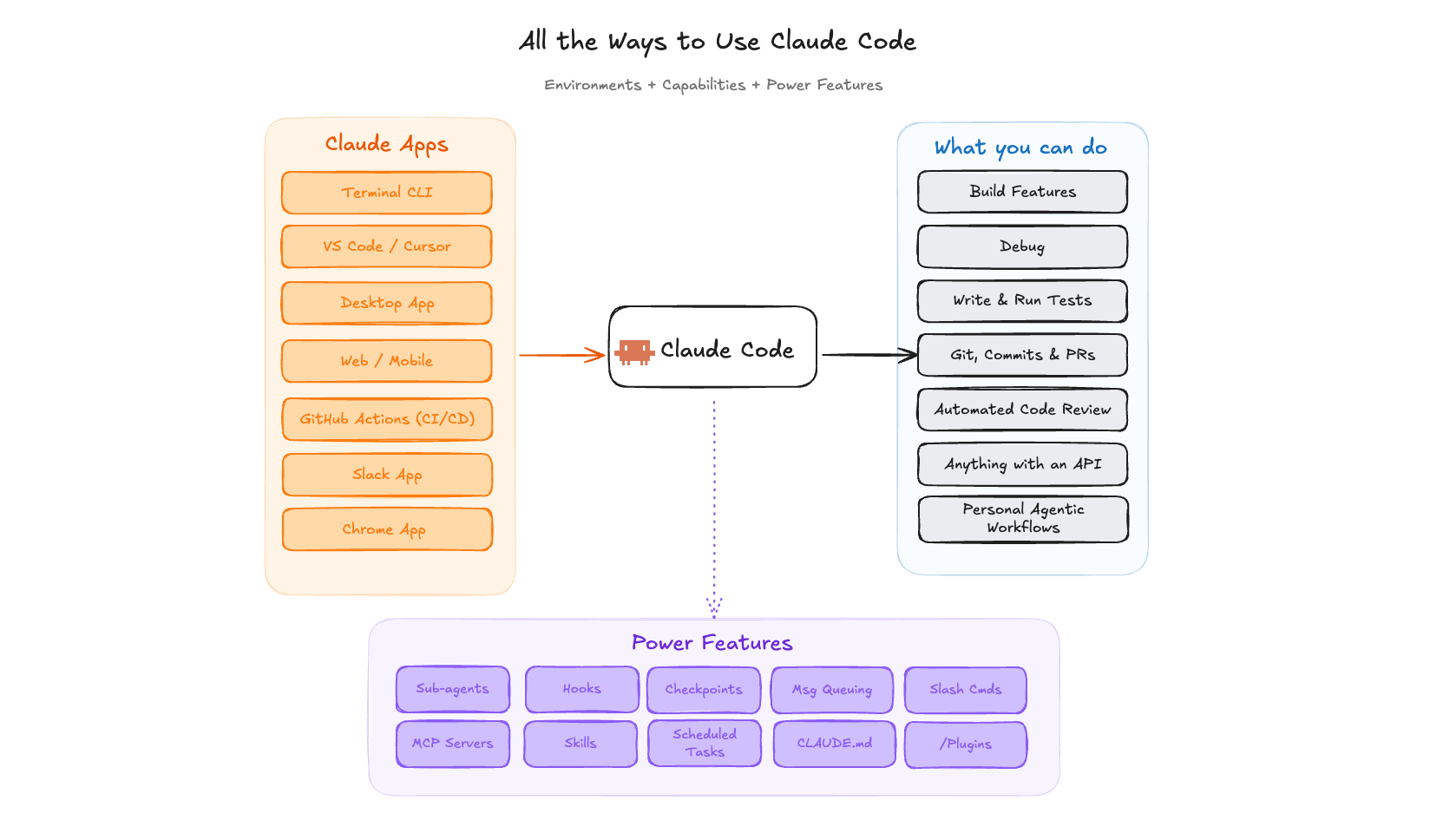
There are 7 ways to access Claude Code.
Anthropic’s Claude models have been popular with the engineers, scientists, and builders we’ve supported over the last couple of years. It’s more recently gotten attention since:
Opus 4.5 was released in Nov 2025, making it smarter and better
People realized Claude Code could be used for more than just coding
Claude Code is different than a chat app (claude.ai) because it can write and read code as well as access local files.
There are different ways to access Claude Code:
Terminal CLI, the OG way of using Claude Code
In your IDE of choice: VS Code, Cursor, Antigravity
Desktop App: Co-work is a light bridge between Claude (the chat), and Claude Code (the coding agent)
Web/Mobile App now has Claude Code session support
GitHub Actions
Slack App
Chrome App
You can also build your own agent with Claude Code Agent SDK.
We recommend 1+2 because it’s the most powerful way to use all of the features of Claude Code at this time. The team is constantly shipping features, and so 3-7 are getting better every single week.
Install Claude
For support installing Claude Code, check out Anthropic’s official guide. And if you have trouble you can ask Claude.ai on web to ask questions.
Note, to use Claude Code you will need a Pro/Max subscription, or an API key.
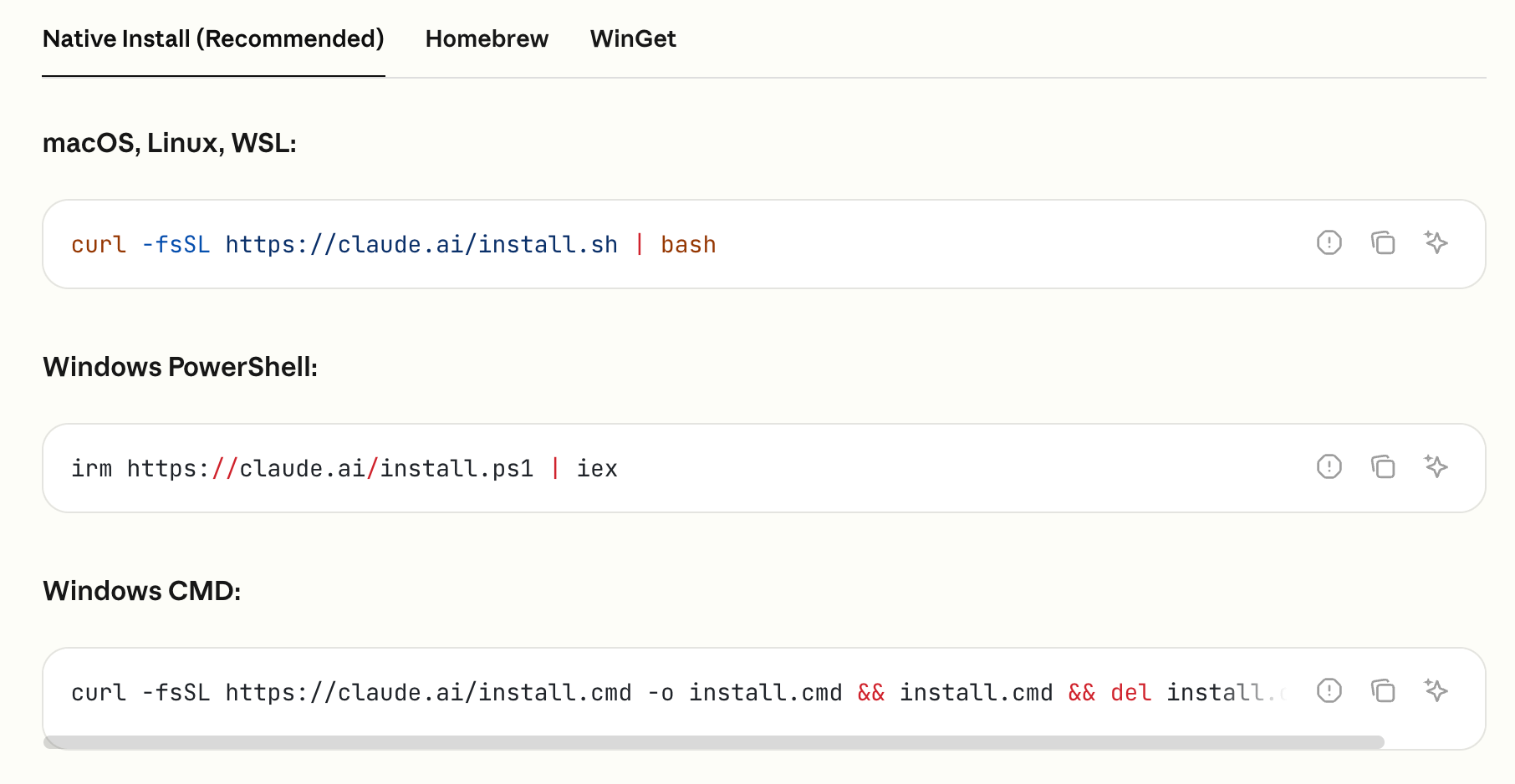
Once installed, you type in the wake up word, “claude,” and that starts a session with Claude Code. You can also use the terminal access in IDE.
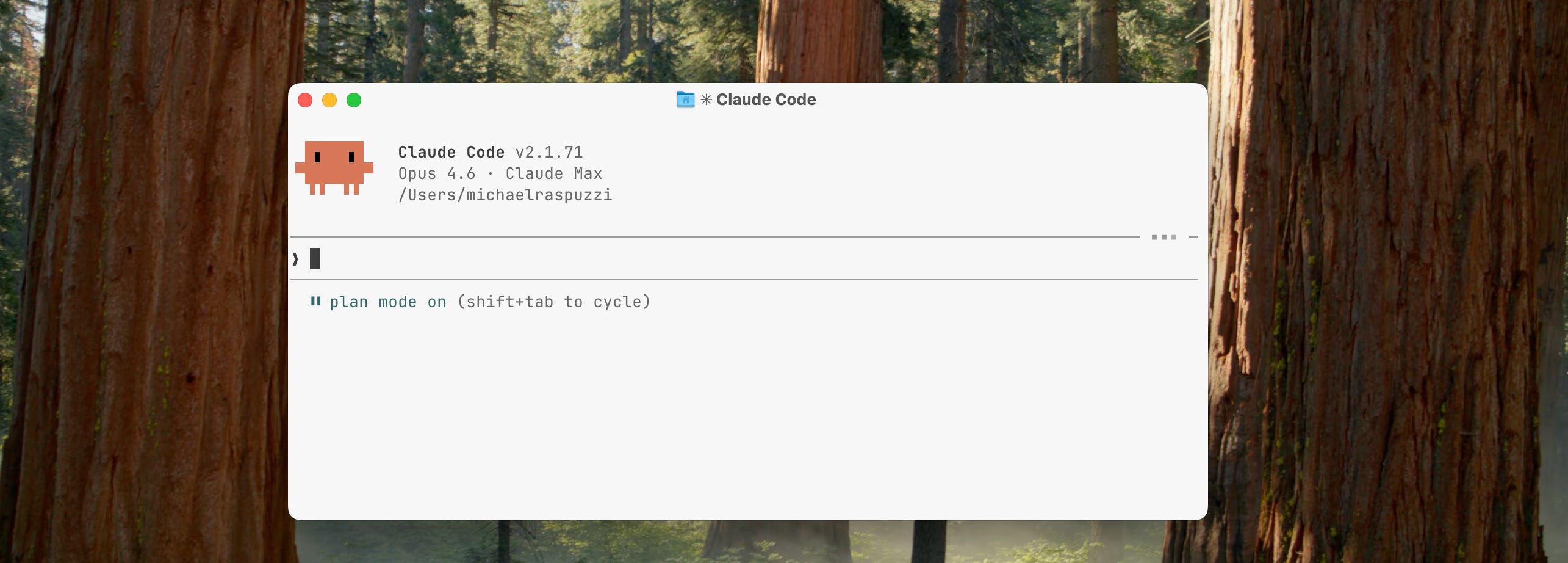
There are three main modes for Claude Code
When you hit Shift+Tab you update the mode for Claude Code:
Plan Mode = talking with Claude to plan updates. It will take no actions until the plan is set. 70-80% of the work with Claude Code can be in plan mode to get things right.
Ask permission = Claude will ask for permission for every update and change.
Accept Edits = Claude Code has permission to make most changes, and will ask for permission for new tool use.
Claude Code operates in the command line and uses tools like: grep, bash, ls, glob, fetch.
Grep — Searches inside files for specific text or code patterns. Like Ctrl+F but across your entire project. “Find every file that mentions
user_auth.”Bash — Runs terminal commands directly. Anything you’d type in your shell —
git commit,npm install,python test.py— Claude can run it too.LS — Lists what’s in a folder. Claude uses this to orient itself and understand your project structure before diving in.
Glob — Finds files by name or pattern. Where Grep looks inside files, Glob finds files themselves. “Show me every
.tsxfile in the components folder.”Fetch — Pulls content from the web. Claude can grab documentation pages, API references, or any URL mid-session so it doesn’t have to guess.
The command line interface is a text based window to control your computer. Everything you can do with the graphic interface, like creating new files or moving folders around, you can do through the command line. With Claude Code being powered by a Large Language Model, a text based interface is good for it.
If you’re new to the command line, try some of these to get familiar with it even before waking up Claude in a session:
ls — List what’s here. Type
lsand hit enter to see all the files and folders in your current location. It’s like opening a folder on your desktop.cd — Change directory (move around).
cd Documentsmoves you into the Documents folder.cd ..moves you back up one level. It’s how you navigate without clicking.pwd — Print working directory. If you ever feel lost, type
pwdand it tells you exactly where you are in your file system. Think of it as “where am I right now?”mkdir — Make a new folder.
mkdir my-projectcreates a folder called “my-project” right where you’re standing. That’s it — you just made something from the command line.cat — Read a file without opening it.
cat readme.txtprints the contents of that file right in your terminal. Quick way to peek at what’s inside something.
Connect Claude Code to other software and data
What makes Claude Code powerful is it’s ability to connect to almost any software and almost any data. If there’s an API, then you can use Claude Code to access it. If there’s MCP or Agent Browser compatibility, even better.
Quick peak to more advanced parts of Claude
Connectors/MCPs allow Claude Code to connect to your email, calendar, GitHub, Notion and hundreds of other tools. More here.
MCP Interfaces are tools that have widgets enabled in Claude.ai web chats. You can design your own interfaces when working with Claude Code locally.
Skills.md enables Claude Code to have specific recipes and knowledge for your workflows. They are composable, meaning you can combine them, and have progressive disclosure, so as not to clog your context. npx skills by vercel has a bunch you can check out.
Hooks enable you to run certain events automatically. Scheduled tasks are new, and enable you to schedule certain sessions in Claude Code.
Plugins are a combination of MCPs, hooks, and skills for additional use cases. Anthropic has official plugins here. Or if you’re in Claude Code, type /plugins to see the list.
This is important: If you ever get stuck or need help with ideas, you can describe what you are trying to do and have Claude figure it out with you.
See what people have built with Claude Code, with the winners of the Opus 4.6 hack
One interesting thing about this hack is it showed the professionals of all different backgrounds can build. Mike B. is an attorney and Michael N. is a cardiologist. Full list of projects and video pitches here on X.
Mike Brown built CrossBeam to speed up California's permitting process by giving builders and municipalities faster tools for code compliance and plan review.
Jon McBee built a visual programming environment for kids where you snap blocks together and Claude spins up agents to build the real code behind the scenes. The first user: his 12-year-old daughter.
Michal Nedoszytko, a cardiologist, built Postvisit to turn visit transcripts and medical records into ongoing, personalized health guidance. Patients leave doctor’s offices every day without understanding their diagnosis.
Asep Bagja Priandana built Conductr to play chords on a MIDI controller and Claude follows along, directing a four-track generative band around you.
Kyeyune Kazibwe built TARA, a dashcam-to-economic-appraisal pipeline that turns road footage into infrastructure investment recommendations.
More resources and examples of personalOS from founders
Boris Cherny on Lenny’s Podcast (1.5hr)
Boris Cherny, the creator of Claude Code, talks about how it went from a quick terminal hack to powering 4% of public GitHub commits and why he believes coding is essentially “solved.” He shares practical tips for getting the most out of Claude Code and Cowork, plus his thinking on what professional work looks like once AI handles the building.Full Tutorial: Build an AI Life Co-Pilot with Claude Code in 25 Minutes | Alex Finn
Alex Finn walks through “Claude Life,” his personal operating system built entirely with Claude Code slash commands and sub-agents including a newsletter researcher that drafts his weekly Substack to a daily news briefer and brain dump analyzer that surfaces content ideas. The big takeaway: Claude Code is really just a general-purpose AI agent, and the skill to build is asking “how can I automate this?” for every task you do throughout your day.Full Tutorial: Build Your Personal OS with Claude Code in 50 Min | Teresa Torres
Teresa Torres, author of Continuous Discovery Habits, walks through how she uses Claude Code as a digital coworking partner for everything: a daily task system, collaborative blog writing (9,000 words in 1.5 days), SEO research, and a three-layer context system that teaches Claude about her business without crowding the context window. Her core advice: treat Claude like a new digital coworker you’re delegating to, build context files gradually instead of all at once, and ask yourself every time you explain something to Claude, “Will I have to explain this again?” if yes, save it.Chief of Staff with Claude Code
An overview of how someone has set up context and multiple agents for personal workflows, like email checker and time boxer. They have a non-technical background and use Claude Code Max plan.
If you have comments, questions, or ideas, comment below!
Made with curiosity by 🌐 Worldwide Studios, a 501c3 CA non-profit hosting AI workshops and hacks.
📆 Check out the full calendar here to join for a future AI workshop.